
Overview (Generated by Yoast)
- The OnePlus Watch 3, launched in February 2025, offers a premium build with an emphasis on durability and style.
- It features a high-quality 1.5-inch AMOLED display with excellent brightness and dynamic refresh rates.
- Powered by Wear OS 5 and Snapdragon W5 Gen 1, it ensures smooth performance and strong battery life, achieving up to 5 days on standby.
- However, it has some drawbacks like occasional Bluetooth connectivity issues and bugs while switching workouts.
- Overall, the OnePlus Watch 3 excels in health tracking and battery life, making it a solid choice for Android users.
It’s common knowledge that the OnePlus Watch 3 is a polished smartwatch built to appeal to a wider user spectrum.
With its premium looks, long-lasting power, and Android integration, it should breeze right through that objective. Well, does it?
Let’s dive a little deeper with the OnePlus Watch 3 to see how its features perform against their projections.
We’ll find out how the smartwatch holds up after prolonged testing, and get to know its strengths and drawbacks.
Skip Ahead

Release and Options
The OnePlus Watch 3 was officially launched on February 18, 2025 to OnePlus’ European and North-American Community members.
The launch was later delayed due to a typo on the rear case of the smartwatch. Retail units started shipping in April 2025.
There are currently 2 variants;
- 46mm (at initial launch) – my review is based on this version.
- 43mm (released July 8, 2025)
For perspective; I have lived with the OnePlus Watch 3 (46mm) for about 4 months now and have tried out a lot of its features.
Premium Style, Pleasant Build
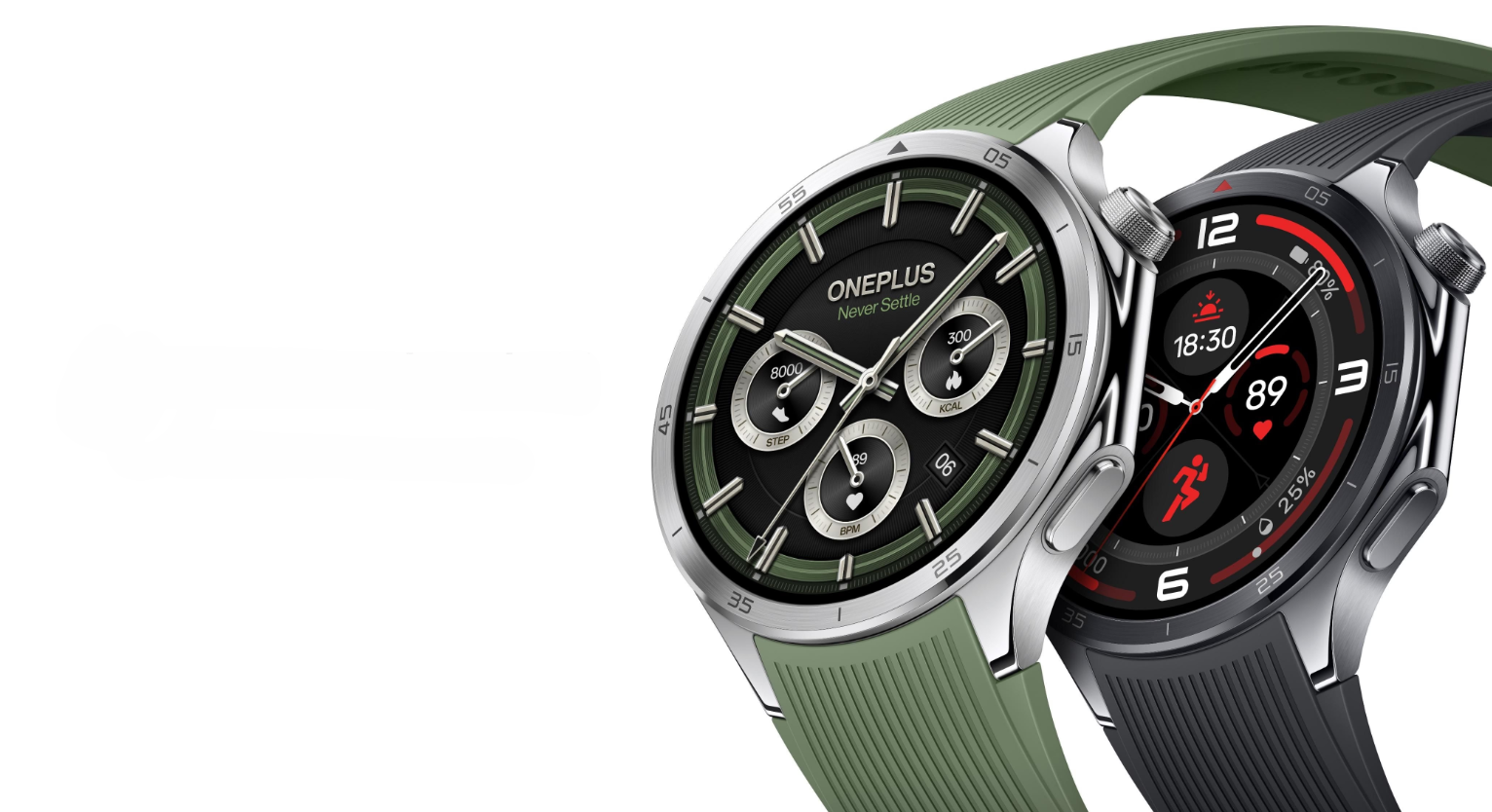
Yes, I know. We seem to drone on about the premium build of the OnePlus Watch 3. But that’s because it makes the smartwatch easy to daily-drive.
- Case: Stainless-steel
- Bezel: Marked titanium
- Cover Glass: Sapphire crystal
- Display: 1.50 inches, 466*466 resolution, LTPO AMOLED tech, and up to 2200 nits peak brightness
- Strap: Curved link 22mm Silicone (Fluororubber)
- Testing Certification: MIL-STD-810H (High temperature 70°C/Low temperature -40°C)
- Water and Dust Resistance: IP68 (test conditions for submersion in up to 1.5 meters of freshwater for up to 30 minutes)
- Water Pressure Rating: 50 meters
That list doesn’t need to get any more exhaustive to speak adequately to the OnePlus Watch 3’s durability and build quality.
Case, Bezel and Cover Glass
To be honest, titanium isn’t my favourite thing in the world. Yes, it comes with improved strength and sheds some weight.
But the final finished surface doesn’t seem to hold up that great compared to stainless steel.
Gladly, in the case of the OnePlus Watch 3, it ages well and withstands impacts like a champ.

I have knocked the bezel against door frames and other surfaces multiple times and it still looks great – with barely visible scratches.
I don’t have any scratches or cracks on my screen either. Thanks to the slightly recessed glass and sapphire crystal.
Display
LTPO enables display refresh rates to be more dynamic. This improves the smoothness of your visuals.
AMOLED improves the control of OLED pixels. This provides a more power-efficient display and access to higher contrasts and deeper blacks.
The OnePlus Watch 3 has both, hence the visual brilliance I experienced once I started interacting with the smartwatch.


Part of that also stems from the 466*466 screen resolution (translating to a pixel density of about 439 pixels per inch, or PPI).
For some context; the Pixel Watch 3 has 320ppi and Samsung’s Galaxy Watch 7’s is about 470ppi.
I also had zero screen visibility issues with the OnePlus Watch 3 outdoors all summer (yes, the Labor Day weekend is already here), thanks to that class-leading peak brightness.
Straps
The OnePlus Watch 3 ships with silicone straps in Emerald (Green) or Obsidian (Black).
It would be nice to have the option to shop their leather variants (Nordic Blue or Brown) out of the box, but you will have to get those as add-ons if you want them.
The OnePlus Watch 3 straps are made of Fluororubber (a synthetic rubber with high heat and chemical resistance).
The outcome is a band that’s durable and finished with a layer of stitched leather or grooves along their length (will depend on your pick of leather or silicone).

The OnePlus Watch 3 is also compatible with 22mm quick-release watch bands, so you can pull off as many looks as you’d like.
I splurged on OnePlus’ Brown Leather strap to dress things up whenever needed. Both straps have held up well so far and still feel good to the touch.
Water Resistance
The OnePlus Watch 3 has accompanied me in the pool and for multiple showers with no concerns afterwards.
OnePlus confirmed that water and dust resistance may be reduced as the device ages. So consider using the Water Ejection feature after every water activity to help prologue this capability.
Hardware and Software
A huge advantage of running on the Wear OS platform is the access to Google’s suite of wearable apps through Google Play.
Wear OS 5
When paired with an Android phone (like in my case), your google apps like Maps, Calendar, and Wallet all sync well with the OnePlus Watch 3.
My unit shipped with Wear OS 5, so in addition to Google Assistant (long-press on the crown by default), there’s Gemini.

The OnePlus Watch 3 isn’t equipped with LTE and will depend on your phone’s internet connection to process requests. But that didn’t stop multiple requests from returning successful results.
Prompts like starting a timer or checking the weather all worked fine – provided the OnePlus Watch 3 remained connected to my phone.
Starting a workout? – no dice. Gemini directed me to “use my fitness app”.
I also tested Google Wallet at Tim Hortons coffee shops multiple times. No lags or errors on my transactions.
Calendar notifications have been timely and detailed, and the Maps navigation worked seamlessly with clear directions.
Replying to text messages has been a breeze, with options for quick-reply, emojis, voice message, voice-to-text, and an on-screen keyboard.
Snapdragon® W5 Gen 1
Being a whole leap ahead of its predecessor, it’s no surprise that the OnePlus Watch 3 is smooth to operate and quick to respond.
The W5 platform is already built to improve user experience by boosting performance while running on relatively low power.

So naturally, you would think that OnePlus might just be over-doing it by introducing a proprietary chip to further manage the OnePlus Watch 3’s power delivery.
Well? turns out they weren’t. Thanks to that decision we get the class-leading 5-day battery life achieved on a Wear OS platform.
32GB Storage
I have been running YouTube Music on the OnePlus Watch 3 (it’s also compatible with Spotify).
For offline music storage, I’ve had 3 playlists containing about 50 tracks each downloaded for my outdoor running workouts.
I have had no concerns whatsoever with the storage space or performance. Downloads were snappy and reliable (will depend on your internet connection).
Connectivity
Here are the highlights for the OnePlus Watch 3:
- Dual band L1+L5, Beidou, GPS, Galileo, GLONASS, QZSS
- WiFi 5G/2.4G
- Bluetooth 5.2
- Support NFC
- Bluetooth calling
Connectivity has been good on the OnePlus Watch 3, as I have had reliable WiFi, GPS, and NFC connections so far.
Bluetooth however, has been a slightly different story – to be fair, Bluetooth Calling has been great.
The call quality has been reliable; the mic and speaker dispatched and returned crisp and clear audio on all my test calls.
Given that Bluetooth 5.4 was released a couple of years ago, I think OnePlus should have chosen a higher standard than 5.2, after all the work they put into the OnePlus Watch 3.
It’s been irksome to have occasional choppy connections to my earbuds when I’m out running and then get suddenly cut off from audio just when I’m about to unleash a second wind (more on that later).
This has been the case with my Android phone connection as well. When I clicked on the error notification, it prompted me to open the OHealth app on my phone to troubleshoot further.
All in all, connectivity tech on the OnePlus Watch 3 is pretty reliable, but OnePlus could have definitely done better with their choice of Bluetooth standard.
Battery Life that’s Poised to Endure
I have put the OnePlus Watch 3 battery through the wringer – multiple times. Each time, it showed resilience.
OnePlus quotes a 5-day battery life with an official watch face, AOD off, and health monitoring set to default parameters.
These were my test parameters and corresponding results on the OnePlus Watch 3:
Test Scenario 1; 5 Full Days Achieved
- AOD on
- No sleep tracking
- No GPS workouts
- Default health tracking settings
- Third-party watch face

Test Scenario 2; 3 Full Days Achieved
- AOD on
- Nightly sleep tracking
- 3 GPS workouts (approx. 30 minutes each)
- 3 non-GPS workouts (approx. 30 minutes each)
- Bluetooth music streaming with each workout
- Default health tracking settings
- Third-party watch face
The OnePlus Watch 3’s battery performance will always vary based on usage, but I bet you will even do better with AOD off.
Not me though! I’m an avid AOD user as I believe watches should always tell the time in-place (no flipping, lifting, flicking or other awkward movements required).
In addition to the OnePlus Watch 3’s impressive battery life, charge times were equally spectacular (with OnePlus’ charge cable and puck as-equipped);
- 50% charge achieved in 13 minutes
- 100% charge achieved in 58 minutes
So, let’s say you’re running late, forgot to charge overnight? – won’t be a problem, just place it on the puck as you get ready to head out.
That will get you enough juice for at least a day.
Overall, in this category of Wear OS smartwatches, the OnePlus Watch 3 takes the title for best battery life.
Progressive Health and Fitness
Even though it came a little later in OnePlus’ OTA (Over the Air) update, they made sure we got the Health Check-In feature on the OnePlus Watch 3.
Health Check-In
This 60-second star-of-the-show feature assesses 6 health indicators and 2 health risks to give you a current and quick snapshot of your health.
You will need to place and hold your finger on the lower button for 60 seconds to complete the all-in-all scan.

“Not a medical device” – OnePlus clearly states but the data returned is a great reference point for folks looking to track their health information from time to time.
Let’s check out some of these health indicators on the OnePlus Watch 3.
Vascular Health
This checks the stiffness of your blood vessels and tracks it against others within your age group.
So far, my OnePlus Watch 3 says mine are within normal range but might be thicker than those of others my age.
And then goes on to say “I should consider making lifestyle changes”. What kind of changes?! Honestly, I wasn’t sure what to do with that information.
Heart Rate and Blood Oxygen
I found the heart rate monitoring feature on the OnePlus Watch 3 to be fairly accurate and consistent, no complaints or weird results there.
SpO2 measurements are generally within a 5% range in my experience, whether tracked via sleep, Health Check-In or independently.
It would be interesting to compare the OnePlus Watch 3 against other brands to see how the measurements vary, but overall, it’s in a good range.
Mind and Body
We’ve all tried to express how we feel using an emoji at one point in our lives. But the OnePlus Watch 3 takes it a step further with their 360 Mind and Body feature.
It makes use of other health indicators in line with your exercise and sleep data to return “Excellent”, “Good”, “Moderate” or “Slow Down” (with emojis to match).


You might get a Cold Sweat emoji when it’s trying to get you to slow down but at least I found it to be a fun way of indicating where your mental and physical states are at.
Sleep Tracking and Wrist Temperature
Sleep tracking on the OnePlus Watch 3 will require a minimum of 1 sleep session of 3 hours or more to return any data.
But once I had logged those hours, I was greeted with a morning report message – bare bones at best compared to its competitors.
A “Good Morning” text, brief weather forecast, and a day/date complication are all I got, with the option to dive into my sleep data, or close the message.


I found sleep tracking on the OnePlus Watch 3 to be accurate overall, with enough details for meticulous folks to deep dive into data from REM, Light, and Deep stages of sleep.
Similarly to Sleep, Wrist Temperature will require a minimum of 5 sleep sessions of 4 hours or more to return any data.
The OnePlus Watch 3 recorded a “baseline” temperature once the sleep hours were logged, and then started tracking changes against the baseline going forward.
Even though it can be affected by factors like a menstrual cycle or illness, the data will be useful to those that need to keep an eye on their body temperature.
Workouts
Picking up from where I left off on Connectivity, workouts are where you’d expect a strong Bluetooth connection on any wearable device.
Although Bluetooth connection is good most of the time, I did experience some inconsistencies while testing the OnePlus Watch 3.
You might also want to turn off the Voice Announcements in the OHealth app settings on your phone.
I was cut off from my music on multiple occasions by a voice trying to tell me I had achieved a goal during a workout.

Some of those times, the sound output gets transferred from my earbuds to my smartwatch speakers – essentially exposing my eccentric playlist and throwing me out of rhythm.
So, if you are in it for pro-level notifications and focus at the same time, you will have to make do with the vibration notification on the OnePlus Watch 3 – no voice.
One other thing I noticed with workouts – there seems to be a bug when immediately transitioning from a GPS workout (like Outdoor Running) to a non-GPS workout (like Strength Training).
The second workout session abruptly ended (multiple times), fundamentally erasing all my progress and record of that workout.
I will test this feature out again after another OTA update, to see if it gets fixed.
But inconsistencies aside on the OnePlus Watch 3, my testing (which was mostly centered around Indoor and Outdoor Running, and Strength Training), proved GPS tracking to be accurate for my use cases.
Get in shape the way you love with over 100 different sports modes on OnePlus Watch 3”.
OnePlus.com
No joke – there’s plenty. OnePlus also promised pro-level tracking for some of these sports.
In my experience with Outdoor Running – it’s no Garmin, but it does track a ton of useful metrics that can help you improve your running form.
OHealth App
Interested in deep diving into those metrics and tracking your progress? That happens on the OnePlus Watch 3’s OHealth App (also available on Apple’s App Store).
On the home screen, you get a set of customizable tiles with all your health data at a glance, including your daily activity.
Health insights, fitness tracking, and device management – the holy grail of any smartwatch app, are all available on the OHealth app.
In my experience, the OHealth app has been good at 2 of those things (fitness tracking and device management).
Health Insights
Not sure if this is in line with other brands, but health insights seem to be limited without consistent data from sleep tracking.
You will also need to make changes to some phone settings to “reduce device disconnections” – essentially allowing the app to run in the background and maintain consistent connection with your device.


Without consecutive and consistent sleep tracking and uninterrupted connection with your phone, health insights from the OHealth app will be impeded.
Watch Faces and Device Management
On the bright side, there’s a ton of resources for device management, including multiple options and categories for watch faces.
Watch faces on the OnePlus Watch 3 are categorized into these groups;
- Recommendations (OnePlus official watch faces)
- Classic
- Utility
- Videos (Yes, you read right – supports GIF)
- Workouts
- Live
- Photos
- Metal
- Big Numbers
- Digital
- Style
- Fun
Watch faces on the OnePlus Watch 3 are well organized and cover a broad use and design spectrum.


If you have a low tolerance for lists, you can scroll right down to the “All watch faces” group and take your pick.
I found most watch faces on the OHealth app to be functional and well-thought-out. They were also free, so that’s a plus.
Not satisfied with the local selection? You can download compatible watch faces from the Play Store (be warned – those come at a premium).
Fitness Tracking
Fitness summaries are well laid out and easy to follow. From there, one click gets you in-depth into workout analyses and records.
Interested in sharing your records? Not a problem. Workout records on the OHealth app can be manually shared across multiple social media apps.


The OHealth app can also be set up to automatically upload workouts to Google Fit, Health Connect, and Strava via the Data Sharing settings.
Does It Hold Up?
The OnePlus Watch 3 is a smartwatch that nails down a lot of the things that Android and Wear OS shoppers are in the market for, and yes – it appears to hold up against the competition is 2025.
It’s not trying to lure users to leap over their walled ecosystems or beat Garmin at their pro-level tracking.
It’s more of a timepiece that’s tailored to the Android user that wants more out of their daily-driver – better battery life, valuable health tracking, premium looks; while frankly remaining a beneficiary of good Wear OS integration.
Strengths
- Premium build and traditional style
- High-quality display
- Powerful and efficient chipset architecture
- Good Wear OS implementation
- Class-leading battery life
- Progressive health features
Drawbacks
- Bluetooth connectivity feels slightly behind
- Highly leveraged health insights on specific data, partly stifled by extensive connection requirements
- Bugs when switching workouts
Eying other smartwatches this year? The pricier Galaxies or maybe the Google Pixels? Let me know in the comments. It’d be interesting to know what features might sway your decisions.